Retro Racing Game on the ATmega328
This project hurts me a bit to be honest because of the fact that it's still unfinished after so many years. Between the moment it started and now I:
- moved country
- got a new job
- opened a side business
- closed a side business (ouch..)
- witnessed my son's growing mustache
Long story short, I reached a point where I started to be satisfied with how the project was turning into but I had to set it aside and forgot about it for almost ten years.
I decided to make a small post about this hoping it would give me back some motivation and eventually finish it like I originally planned to. This is not a detailed howto with an available repository since I don't consider this project finished yet, I would like to make another article once it reaches its final version.
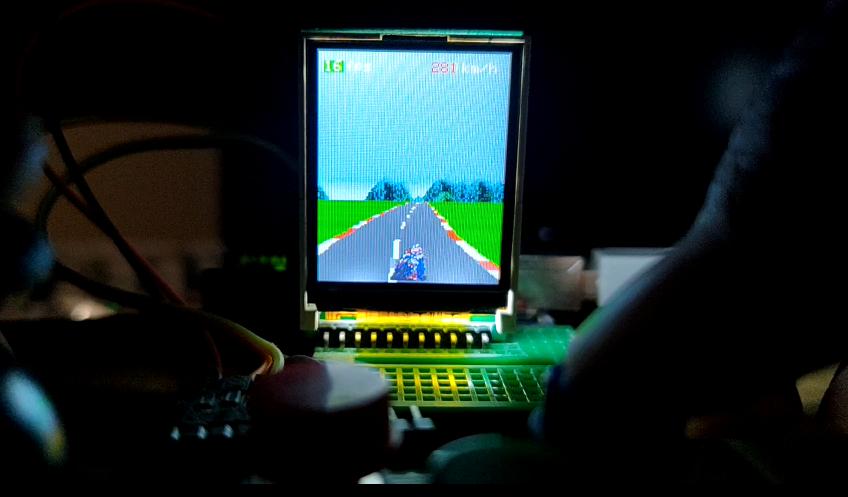
Story time
After creating a Flappy Bird Clone on the ATmega328 over a decade ago, I wanted to know how far I could go with another type of game on an Arduino.
In the late 80s a friend of mine had Chase H.Q. on his Amstrad and I remember having so much fun playing these racing games. I was also fortunate enough to witness the release of groundbreaking titles such as Stunt Car Racer where the feeling of driving in a 3D world was unprecedented to me and many others at the time.
And I of course cannot forget to mention the amazing Road Rash game.
This made me wonder if I could try creating a classic retro racing game on the ATmega328, in my mind if really old hardware could pull that off then maybe this small microcontroller could do it as well.
I also wanted the game to have a motorcycle just like Hang On.
This is great.. but how ?
After learning some tricks while making the Flappy Bird Clone I felt somehow confident enough in believing that it could be possible to create such game with an acceptable framerate.
The main idea was to start with a proof of concept where the player could ride on an infinite road.
I wasn't sure however about the best way to create the road and especially hills. Then I found the holy grail of retro 3D racing games knowledge: Lou's Pseudo 3D Page
In his article Lou explains in pseudo code how to start from a simple road to curvy hills and without his explanations I'm unsure I would have managed to end up with a working proof of concept.
Hardware, library and assets
I started this project on my old Arduino Uno and recently built the project again on an old Arduino Nano v3.0.
For the display I used the same Sainsmart 1.8" TFT ST7735 screen I have in my other projects.
To get optimal performances I used XarkLabs PDQ_GFX_Libs just like when I made Tiny 3D Engine on the ATmega328.
Player and background sprites are borrowed from Super Hang-On. (ripped by Elektro-OMEGA)
Optimization tricks
Here is a list of tips and tricks I kept as notes:
- use a single TFT.spi_begin() / TFT.spi_end() transaction
// main loop
do {
    // update state
    // ...

    // single drawing transaction method (one spi_begin / spi_end)
    TFT.spi_begin();

    // do all the drawing
    // ...

    // end of drawing transaction
    TFT.spi_end();
} while(1);
Instead of calling functions that would draw immediately on screen I prepare a transaction with all our pixels set at once. A single transaction saves many cycles.
- use address window and push as many pixels as possible at once
This is an old game with no texture and only flat colors, grouping pixels by colors helped reducing calls.
  // draw road and sprites
  do {
    // we are going to draw a line with full width
    TFT.setAddrWindow_(0, lineY, TFTW, lineY);

    // draw left grass only if visible
    // ---------------
    if (stripeL > 0) {
      TFT.spiWrite16(colorGrass, stripeL);
    }

    // draw left stripe only if visible
    // ---------------
    if (roadL <= TFTW) {
      TFT.spiWrite16(colorStripe, roadL - stripeL);
    }

    // ...
By using setAddrWindow_ we can define an area we intend to draw into and push pixels with a single spiWrite16 call. This is really handy as it allows us to paint multiple pixels at the same time. Following this method I paint each part of the road, let it be stripe of grass, dash (red or white), asphalt and the middle white dash.
- drawing the motorcycle and the road at the same time to avoid flickering
Since double buffering is not possible on the ATmega328 I had to draw the player's motorcycle and the road at the same time. We can still see some tiny flickering but it's not too annoying.
I used a color palette for the road, stripes and sky.
// ----------------------------------------------
// colors data
// ----------------------------------------------
static const unsigned int COLORSTRIPE    = TFT.Color565(255,  68,  68);
static const unsigned int COLORROAD      = TFT.Color565(166, 166, 166);
static const unsigned int COLORGRASS     = TFT.Color565(  0, 238,   0);
static const unsigned int COLORSKY       = TFT.Color565(160, 196, 255);
// alternative colors
static const unsigned int COLORSTRIPEALT = TFT.Color565(255, 255, 255);
static const unsigned int COLORROADALT   = TFT.Color565(160, 160, 160);
static const unsigned int COLORGRASSALT  = TFT.Color565(  0, 221,   0);

// ...

// ============================
// stripe colors
// ============================
// shades of colors based on zMapRoad values
// giving the illusion we are going forward
// using bitwise-AND instead of modulo 128
if (((int)((zMap[zMapPos] + zMapOffset) * 128) & 127) > 64) {
  colorStripe = COLORSTRIPE;
  colorRoad = COLORROAD;
  colorDash = COLORROAD;
  colorGrass = COLORGRASS;
} else {
  colorStripe = COLORSTRIPEALT;
  colorDash = COLORSTRIPEALT;
  colorRoad = COLORROADALT;
  colorGrass = COLORGRASSALT;
}
// ...
It will be much easier if I want to change it dynamically later to make it seems like we are on a different track / level.
The motorcycle is using a set of sprites for various lean angles, there is also a palette to define "other" motorcycles if we ever reach this point.
I also set an index on the color palette to specify which one should be transparent.
// draw player sprite
// ---------------
// when the player turns we compare the playerLean values and draw
// different sprites to display how much angle the bike is leaning
// player is turning left
if (playerLean < -PLAYER_LEAN_SOFT && playerLean >= -PLAYER_LEAN_HARD) {
  drawSprite(bikerTurn,
             bikerPalette,
             bikerPaletteTransparent,
             TFTW2,
             playerY,
             bikerTurnWidth,
             bikerTurnHeight,
             false);
} else
// player is turning right, mirror sprite
if (playerLean > PLAYER_LEAN_SOFT && playerLean <= PLAYER_LEAN_HARD) {
  drawSprite(bikerTurn,
             bikerPalette,
// ...
Here is how I declare the biker upright sprite with a palette for the player:
// we use a single palette for all biker sprites
const unsigned short bikerPalette[] = {
  TFT.Color565(159, 161, 158),
  TFT.Color565(115, 115, 132),
  TFT.Color565(0, 1, 225),
  TFT.Color565(255, 0, 205),
  TFT.Color565(224, 32, 27),
  TFT.Color565(240, 240, 240),
  TFT.Color565(191, 38, 38),
  TFT.Color565(60, 60, 209)
};

// each pixel points to a palette index
const unsigned char biker[] PROGMEM = {
  3,3,3,3,3,2,5,5,2,3,3,3,3,3,
  3,3,3,3,2,4,4,4,4,2,3,3,3,3,
  3,3,3,3,4,5,0,0,5,4,3,3,3,3,
  3,3,3,3,4,1,0,0,1,4,3,3,3,3,
  3,3,4,0,4,4,4,4,4,4,5,4,3,3,
  3,4,4,0,5,5,5,5,5,5,6,4,4,3,
  3,5,1,6,2,2,2,2,2,2,5,1,5,3,
  4,0,1,1,5,5,5,5,5,5,2,1,0,4,
  0,7,1,1,2,5,5,5,5,2,0,1,7,0,
  5,2,0,5,2,2,2,2,2,2,2,0,2,5,
  7,7,0,0,2,2,2,2,2,2,0,0,7,7,
  2,2,1,7,2,2,2,2,2,2,7,1,2,2,
  2,7,7,7,0,5,5,5,5,0,0,7,7,2,
  2,2,7,0,0,5,5,5,5,0,1,7,2,2,
  1,1,5,1,0,5,5,5,5,0,0,5,1,1,
  4,4,5,1,5,1,6,6,1,5,1,5,4,4,
  5,6,5,1,2,1,6,6,1,2,1,5,6,5,
  5,6,6,0,2,7,7,7,7,2,2,6,6,5,
  3,4,6,6,7,1,1,1,1,7,2,6,4,3,
  3,1,1,7,1,1,1,1,1,1,1,1,1,3,
  6,1,1,7,1,1,1,1,1,1,1,1,1,6,
  1,1,1,7,1,1,1,1,1,1,1,1,1,1,
  3,1,1,7,1,1,1,1,1,1,1,1,1,3,
  3,3,1,7,1,1,1,1,1,1,1,1,3,3,
  3,3,1,2,1,1,1,1,1,1,1,1,3,3,
  3,1,1,1,1,1,1,1,1,1,1,1,1,3,
  3,1,1,1,1,1,1,1,1,1,1,1,1,3,
  1,1,1,1,1,1,1,1,1,1,1,1,1,1,
  3,1,1,1,1,1,1,1,1,1,1,1,1,3,
  3,3,1,1,0,1,1,1,1,0,1,1,3,3,
  3,3,1,1,0,1,1,1,1,0,1,1,3,3,
  3,3,3,1,1,1,1,1,1,1,1,3,3,3
};
const unsigned char bikerWidth = 14;
const unsigned char bikerHeight = 32;
(I wanted to show the motorcycle sprites but I'm unsure on the legal side)
To save PROGMEM storage space I mirror the drawing when leaning right or left and specify the mirror state when calling drawSprite.
// ----------------------------------------------
// sprites related functions
// ----------------------------------------------
// draw sprite line by line when lineY is between spriteY and spriteY + spriteHeight
// drawing the sprite this way avoids too much flickering with the road
static void drawSprite(const unsigned char *sprite,
                       const unsigned int *spritePalette,
                       const unsigned char spriteIndexTransparent,
                       const unsigned char spriteX,
                       const unsigned char spriteY,
                       const unsigned char spriteWidth,
                       const unsigned char spriteHeight,
boolean mirror) {- drawing the mountains using the "painter" method
I use the painter trick I discussed in the Flappy Bird article for the mountains in the background, depending on the horizon position I draw the sprite or erase it with the road.
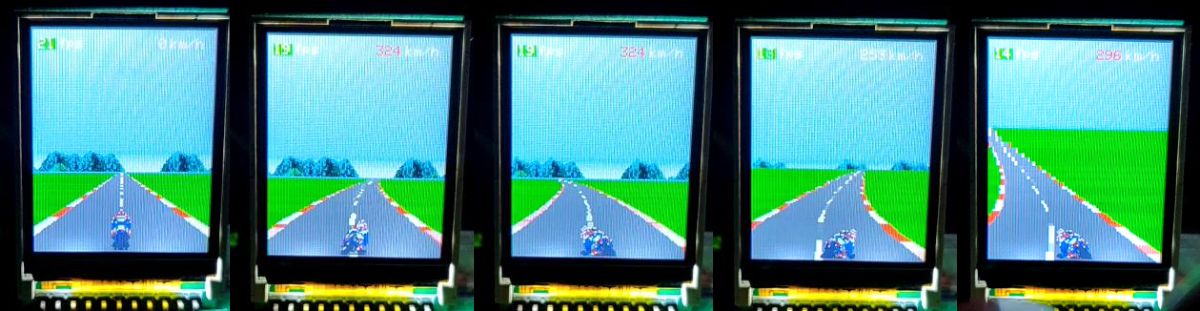
Even though the mountain sprite is quite big as it's filling the 128 pixels width of the screen and takes 16 pixels high, I still decided to keep it because it adds so much more than a plain blue sky.
When cornering in the game the mountains sprite moves horizontally and wrap around the other side.
- avoid using float as much as possible
Using floats only when necessary (still having too many), it would be much better to convert everything to fixed point using bit shifts and this is mostly the reason I never finished this project.
I started to look into how I could convert everything to fixed point and I had to stop there unfortunately. Right now the framerate is between 14 and 21 fps. I'm pretty sure ditching floats completely would help tremendously with performances.
This is where I plan to continue this project by converting to fixed point.
- avoid using division and modulo operators
When possible I used bitshift instead of division operation because the ATmega328 has no floating point unit nor hardware divider.
Modulo was only used for the stripe giving us the sensation of speed when going forward, so I had to find a way to avoid wasting cycles:
  // ============================
  // stripe colors
  // ============================
  // shades of colors based on zMapRoad values
  // giving the illusion we are going forward
  // using bitwise-AND instead of modulo 128
  if (((int)((zMap[zMapPos] + zMapOffset) * 128) & 127) > 64) {
// ...- always try to set the appropriate type of a variable
No need to have integer if we know our value will fit into an unsigned char for example.
- just doing the following saved between 2 and 4 fps
If you often do the same calculations in a function, calculate it once in a variable and use that instead. Technically, depending on the calculation and the compiler optimization flags it could do that automatically.
I stored the road, stripe and dash width in an array since the road will always look the same there is no need to calculate it every time in the main loop.
// RoadData precalculation used for road drawing
// we store this data to avoid doing unnecessary
// calculations in the main loop and save cycles
// we lose memory space but gain in performances
struct RoadData {
  unsigned char roadWidth;
  unsigned char stripeWidth;
  unsigned char dashWidth;
} roadData[ROADLINES];
I precalculate the road and zMap With a list of curves, hills and durations for the track.
static const Track track[TRACKSECTIONS] = {
                                          {    0,     0,   1},
                                          { 0.01,     0, 1.5},
                                          {-0.01,     0,   2},
                                          {-0.03,     0, 1.5},
                                          { 0.02,  0.01, 1.5},
                                          {    0, -0.01, 0.5},
                                          {    0, -0.01, 0.5},
                                          { 0.01,  0.01,   1},
                                          {-0.03,  0.03, 0.3},
                                          { 0.05, -0.02,   1},
                                          {-0.03,  0.02,   1},
                                          {    0, -0.01, 1.5},
                                          {-0.01,  0.02,   1},
                                          {-0.01, -0.02,   2},
                                          {    0,  0.02, 0.5},
                                          {-0.01, -0.02,   2},
                                          { 0.02,  0.03,0.25},
                                          { 0.03, -0.01, 1.2},
                                          { 0.04, -0.02, 0.6},
                                          {-0.02,  0.01, 0.4}
                                        };

// ----------------------------------------------
// initial setup
// ----------------------------------------------
void setup() {
  // initialize TFT screen and debugging informations
  initTFTAndDebuggingInfos();

  // do not touch the joystick in order to get center values
  // we calibrate joystick during setup
  initController();

  // precalculate road and zMap
  precalculate();

  // reset segment position to bottom of the screen
  segment.position = TFTH;
}
Proof of concept
I did manage back then to make a working proof of concept but I really wanted to push the performances to leave room for more ingame features such as obstacles on the road or even other motorcycles if it's even possible.
Next step is finding time and convert float to fixed point, that would be such an awesome optimization. Simple tests were showing a gain of about 10fps but the road was not smooth enough and some weird artifacts were introduced.
Here is a video of the latest build from a 2017 commit with debugging info and no specific compiler flag:
If I manage to make a better performing fixed point version I'll make another article explaining everything with a git repository.